
Find your parts diagram
Sticker on the pump body (the part with the basket), not on the motor. Motor labels from Century, A.O. Smith or Regal won't match parts.
Label on the side of the tank near the base. Size is in sq ft, e.g. 420 sq ft = C4030 or CCP420.
Rating plate inside the front access panel. Note the BTU and gas type (NG or LP).
Molded into the body or printed on top. Robotic cleaners: on the power supply.
Still not sure? Call (818) 818-6559 and we'll find it for you.


R0503000 | Jandy Nature2 Fusion Soft 1400 Electrolytic Cell For Salt Systems
Compatibility
Pickup, delivery and shipping times are estimates, not guarantees.
Couldn't load pickup availability
● 10+ in stock30-day returns⚠ CA WARNING
Store Availability
Checking store stock…
Choose store pickup at checkout. Usually ready in 1–3 hours during store hours. Not at your store? We can transfer it there, usually in a couple of days.
Have a question about this part?
Goes with this part
Manuals & documents
CA P65 Warning: Cancer and reproductive harm. www.p65warnings.ca.gov
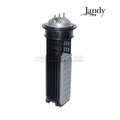
The Nature2 Fusion Soft system integrates an electrolytic cell and a mineral cartridge to sanitize pool water effectively. The power pack is wired directly to the pool circulation pump's electrical supply, allowing the electrolytic cell to operate only when the pump is running, ensuring safe and synchronized chlorine generation. Chlorine is produced as saltwater passes through the cell's bipolar electrodes, which are energized by DC current. The chlorine output can be adjusted either via the Chlorine Production Level setting or by changing the system’s daily run time. To ensure continuous performance, the system automatically reverses polarity every three hours to clean the electrodes without halting chlorine production. The mineral cartridge dispenses trace levels of silver and copper to work alongside chlorine, supporting long-term algae control.
-
Integrated Cell Activation: Power source is linked to the pool pump, ensuring chlorine is produced only when circulation is active
-
Flow Sensor Backup: Includes a secondary flow/temp/salinity sensor to enhance system reliability and safety
-
Adjustable Chlorine Levels: Output can be customized through the power center or by modifying daily operating hours
-
Automatic Electrode Cleaning: Reverses polarity every three hours to prevent scaling and maintain uninterrupted function
-
Mineral Support System: Releases silver and copper ions that complement chlorine to keep pool water algae-free
- Unplug the DC cord from electrolytic cell.
- Run the pool pump and filter for five (5) minutes. After this time turn off the pool pump.
- Close valves between filter and pool to prevent pool draining.
- Unplug the DC cable from the electrolytic cell.
- Turn the large collar counterclockwise to remove and save for reinstallation.
- Remove the O-ring and discard.
- Remove the existing the electrolytic cell from the vessel.
- Install the O-ring provided in the kit. Make sure the O-ring is seated properly.
- Install the new electrolytic cell into the vessel.
- Hand tighten the large collar. Do not over tighten.
- Plug the DC cable into the electrolytic cell. Press cable down firmly onto ports.
- Reset valves and switches. Turn pump and sanitizer on. Wait five (5) minutes for system to go
through its diagnostics. - Confirm chlorine output and settings on the user interface.
- For operating instructions, please refer to the Nature2 Fusion Soft Installation and Operation Manual, originally supplied with the product.
- The purer the salt the better the life and performance of the electrolytic cell. Use a salt that is at least 99.8% pure NaCl. The ideal salt is an evaporated, granulated, food-quality, non-iodized salt. Consult your salt supplier.
- Set chlorine production to 00%. Operating the unit above 00% production without salt will damage the electrolytic cell. The Salinity button C on the sanitizer user interface keypad can be used to determine salinity in the case of a new pool installation, or a complete water change so long as the chlorine production is set to 00%.
- Never use dry acid to adjust pH in arid geographic areas with excessive evaporation and minimal dilution of pool water with fresh water. A buildup of by-products can damage the electrolytic cell.
- Do not operate the electrolytic cell without water circulation. A buildup of flammable gases will result in FIRE or EXPLOSION.
- (1) Jandy R0503000 Cell
- (1) Jandy Cell O-Ring
- Jandy Nature2 Fusion Soft Water Sanitizer model FSOFT1400
Note: This cell may be compatible with your Salt Chlorination System, please refer to your systems owners manual to ensure compatibility.

What LA pool owners say about us
Google reviews of our 8 stores — our service and shopping experience, not reviews of this product.